Clocker Get Clocker

Time goals for Jira Cloud

Your daily time goal, right in Jira's Log time dialog.

Clocker shows how much time you still need to log while you log it, and keeps your week in one view. Every entry is a normal Jira worklog.

Illustration of the Log time dialog

Features

Logging time stops being a Friday chore.

People log more accurately when they can see the gap. Clocker puts the gap everywhere they work: the dialog, the issue, their week and their month.

A Log time dialog that knows your day

As you type, Clocker previews the entry against today's goal: "+1h 30m with this entry → 2h left". One click on Fill to goal logs exactly the time still missing.

  • Jira-style durations: 1h 30m, 1.5h, 90m, 1:30, 1d
  • Start time picked right after your last worklog of the day
  • Overlap and future-date warnings, all four remaining-estimate modes
  • Can replace Jira's own Log work button for the whole site
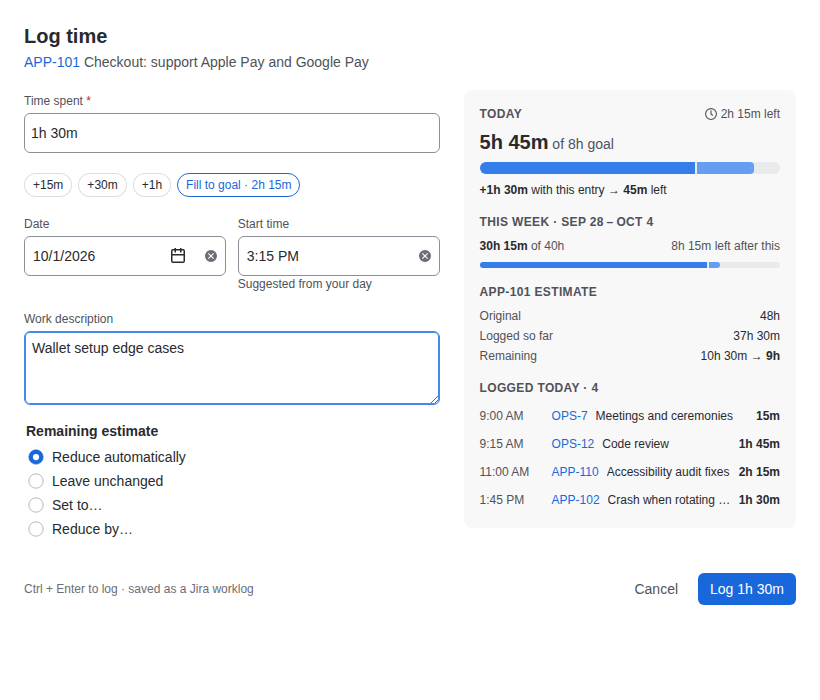
The Clocker Log time dialog with a 1h 30m entry previewed against the daily goal.

A timer on every issue

The Time today panel on the issue shows your day and week at a glance. Start the timer, pause it for lunch, and Stop & log rounds the result by your team's rule.

  • One timer per person, kept on the server, so a closed tab loses nothing
  • Rounding to 5, 6, 10, 15, 30 or 60 minutes, up or to the nearest step
  • A nudge when your last working day came up short

Your week as a timesheet

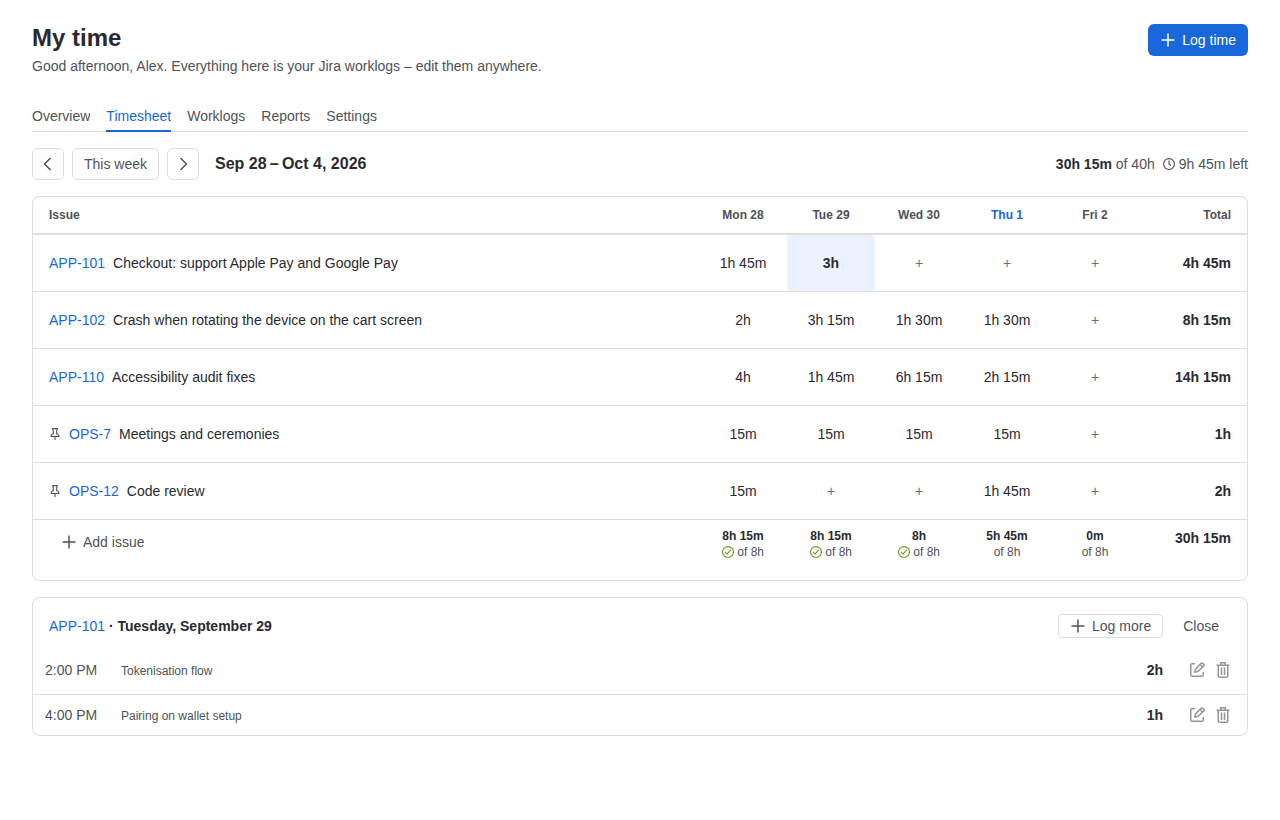
My time lays out issues against days, with each day's total measured against your goal. Short days show exactly how much is missing, and one click logs it.

  • Pinned issues for the things you log every week
  • Click any cell to log time on that issue and day
  • Worklog list with inline edit, delete and CSV export

A month you can read in a second

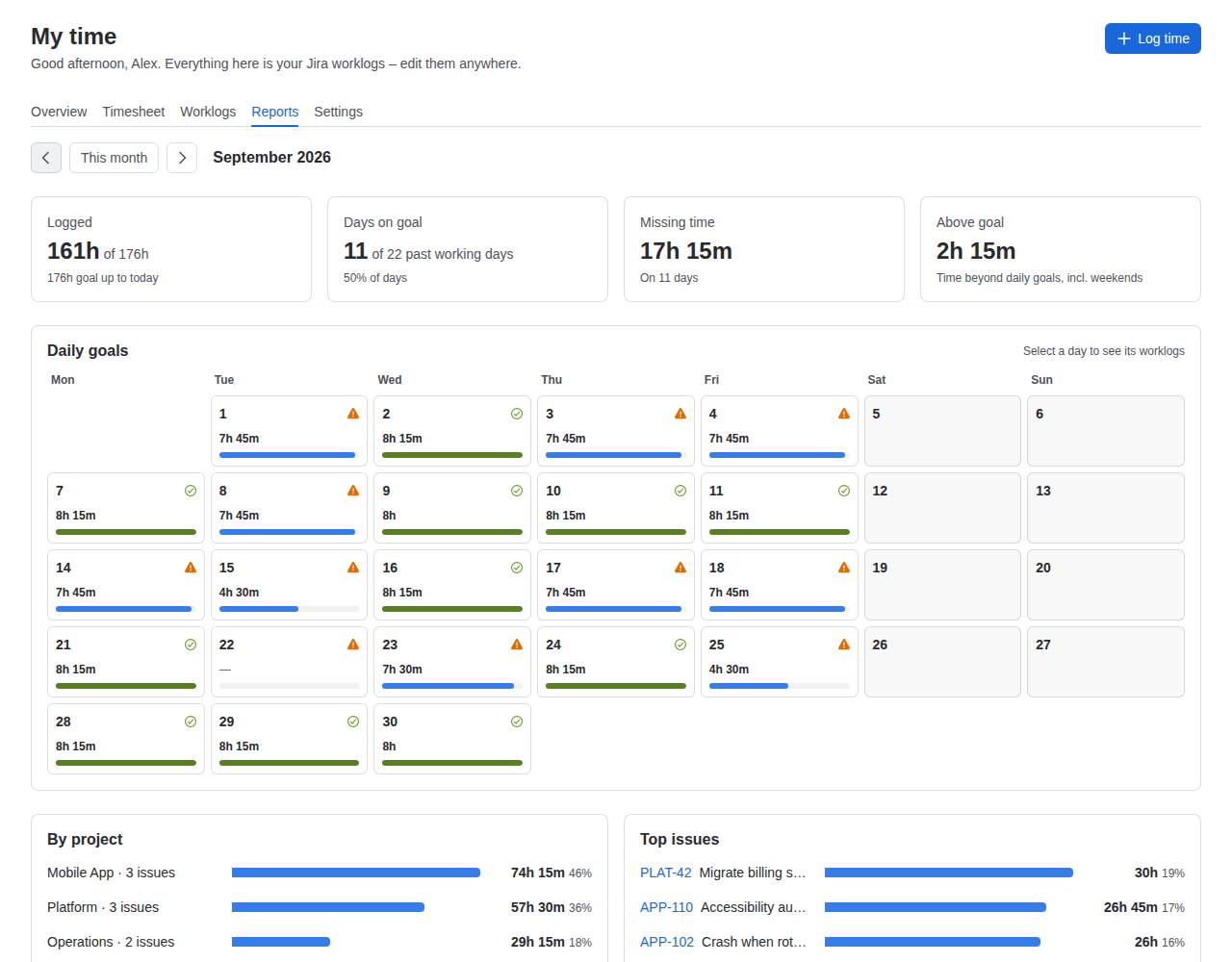
Reports draws every day as a goal ring, with totals per project and issue below. Holidays and days off count as zero, so the month is measured fairly.

  • Days on goal, missing time and logged time for any month
  • Breakdowns by project and by issue
  • Personal goals, per-weekday goals, holidays and days off

How it works

No second time database. Just Jira.

Clocker reads and writes Jira's own worklogs, as you, with your permissions. That means your existing reports, filters and exports keep working, and nothing is locked in.

  1. Install from the Atlassian Marketplace. A Jira admin approves it once.
  2. Set a goal. The site default comes from Jira's working hours; people can set their own.
  3. Log time as usual. Clocker shows the gap and keeps the week in view.
Clocker Log time dialog · timer · timesheet · reports
Jira worklogs the same records Jira's Log work creates
  • Time tracking field
  • Jira reports
  • Other time apps
  • Exports
worklogAuthor = currentUser()
AND worklogDate >= startOfWeek()

Works in JQL like any worklog, because it is one.

Screens

What it looks like in Jira

Screens from the app, with demo data. Clocker follows Jira's light and dark themes.

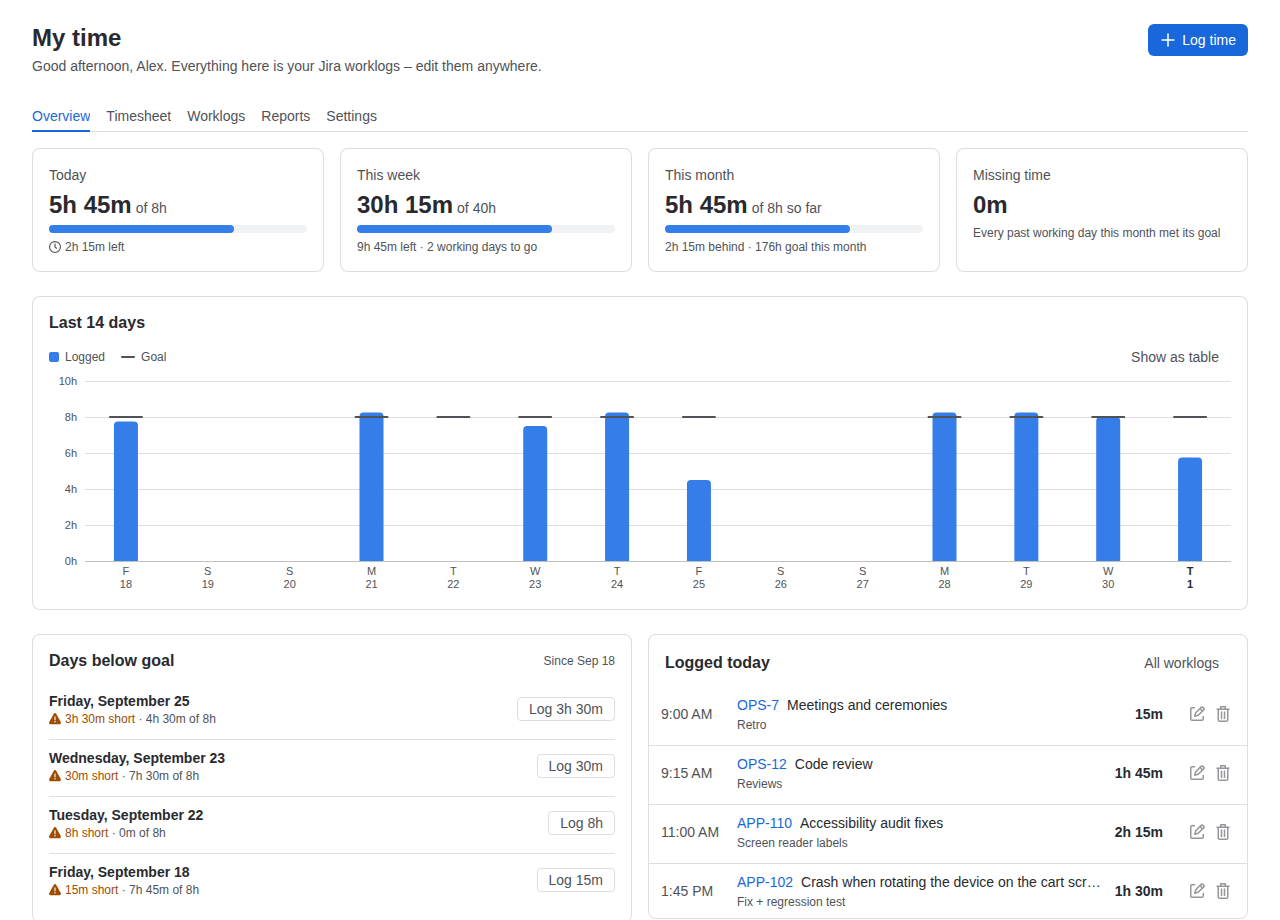
My time overview: today, this week, this month, a 14-day chart and days below goal.
My time: today, the week, the month, and days below goal
Weekly timesheet with issues as rows and days as columns.
Timesheet: issues by day, with daily goal status
Monthly report with a calendar of daily goal rings and breakdowns by project and issue.
Reports: a calendar of goal rings and breakdowns
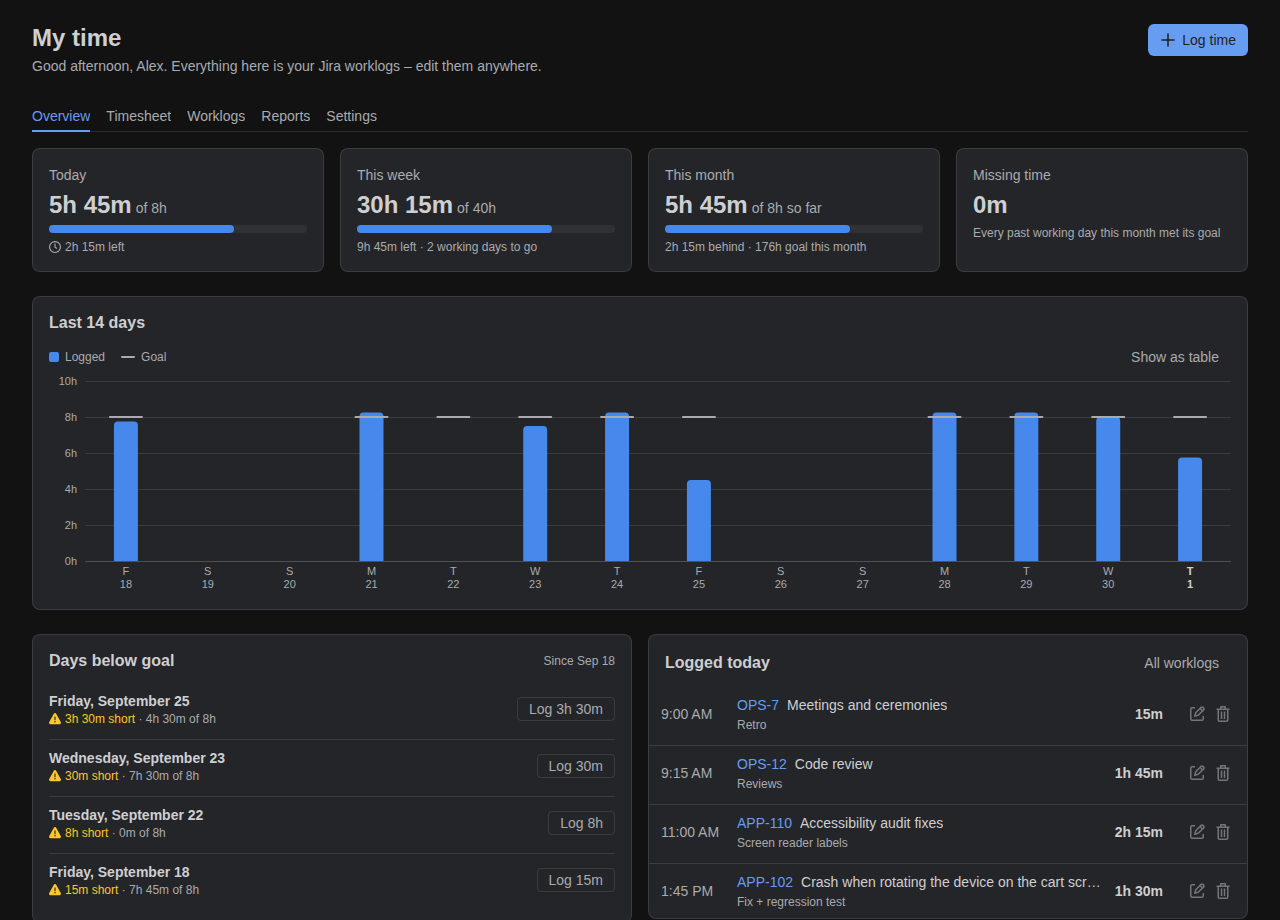
My time in Jira's dark theme.
Dark theme, contrast-checked charts

For Jira admins

Sensible defaults, set once for the whole site

Goals
A default daily goal and working days, seeded from Jira's working hours per day. Allow or lock personal goals.
Holidays
Company holidays count as zero for everyone, so nobody looks short on a day off.
Logging rules
Require a work description, and choose whether logging time lowers the remaining estimate by default.
Timer rounding
Round timer entries up or to the nearest step: 5, 10, 15, 30 or 60 minutes, or 6 for tenth-of-an-hour billing.
Time tracking provider
Make Clocker replace Jira's Log work button and Work log tab. Switching back moves no data.
Dashboard gadget
Today, this week and the running timer on any Jira dashboard.

Security and privacy

Your data stays in Atlassian's cloud

Clocker runs entirely on Atlassian Forge. It has no servers of its own and makes no calls outside Atlassian. Worklogs live in Jira; Clocker stores only preferences and running timers, in Forge storage.

Every permission Clocker asks for, and why:

  • read:jira-workfind your worklogs, read issues and permissions
  • write:jira-workcreate, edit and delete worklogs you're allowed to
  • read:jira-useryour time zone and the site's time tracking settings
  • storage:appgoals, preferences and running timers

Clocker is coming to the Atlassian Marketplace

You'll install it from the Marketplace in a couple of clicks, try it free, and pay through your Atlassian bill like any other app.

Coming soon to the Atlassian Marketplace

Questions

Does Clocker replace Jira's time tracking?

No. It uses it. Every entry is a standard Jira worklog, so the time tracking field, estimates, reports and JQL all keep working. Admins can optionally make Clocker the time tracking provider, which swaps Jira's Log work button for Clocker's.

What happens to our data if we uninstall?

Your worklogs stay exactly where they are, in Jira. Only Clocker's own preferences and running timers are removed.

Can people see each other's goals?

No. Personal goals and settings are private to each person. Worklogs are visible to whoever can already see them in Jira.

Does it handle time zones and daylight saving?

Yes. Days follow each person's Jira profile time zone, and start times stay correct across daylight saving changes.

Which projects does it work with?

Company-managed and team-managed Jira Cloud projects with time tracking turned on.

Is Jira Data Center supported?

Not at the moment. Clocker is built for Jira Cloud.